


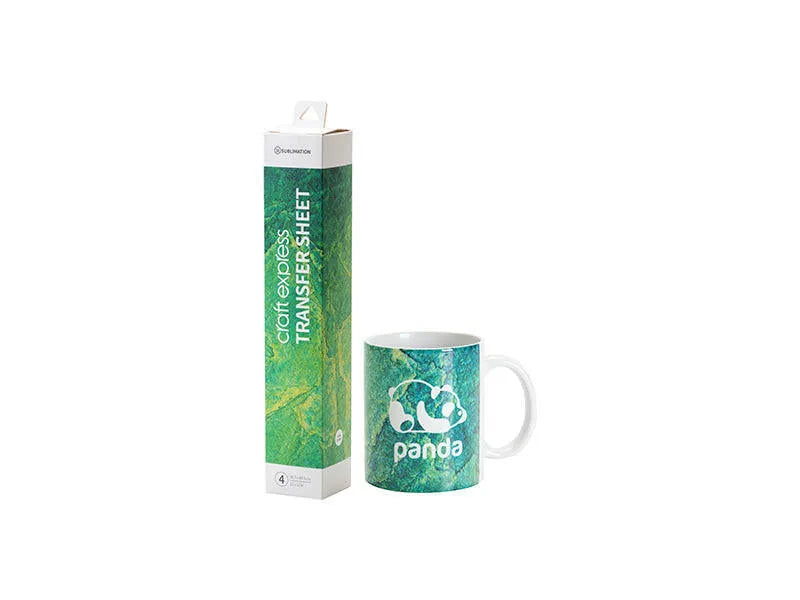


Craft Express 4 Pack 12x12 Pre-Printed Sublimation Sheets
Bring patterned details to personalized gifts with Craft Express 4 Pack 12x12 Pre-Printed Sublimation Sheets. Choose a design option and use the supplied patterns as backgrounds or standalone decorations on compatible sublimation blanks. No sublimation printer or separate ink is needed.
Works with
-
 Sublimation

Choose options
Description
Ready-printed color. Your own creative direction.
Bring patterned details to personalized gifts with Craft Express 4 Pack 12x12 Pre-Printed Sublimation Sheets. Choose a design option and use the supplied patterns as backgrounds or standalone decorations on compatible sublimation blanks. No sublimation printer or separate ink is needed.
Picture a patterned panel on a suitable polyester tote, with a matching section used on a coated coaster or mug. Trim the sheet to suit each project, plan its placement, and apply it using the correct recipe for that blank. Your choice of pattern, shape, and surface brings the collection together.
Why choose these transfer sheets?
- Four pre-printed sheets: Start with supplied artwork instead of printing a transfer yourself.
- 12 × 12-inch format: Plan larger panels or trim sections for smaller projects.
- Selectable designs: Choose the option for your project rather than assuming every pattern comes in one pack.
- Backing grid and cutting guide: Listed features for layout and preparation.
- Blowout paper included: Protective paper is named in the contents description; quantity and dimensions are not specified.
- Already mirrored: The FAQ identifies the artwork as mirrored for face-down transfer.
Specifications and buying details
| Detail | Product information |
|---|---|
| Pack contents | 4 pre-printed sublimation sheets, plus listed blowout paper |
| Sheet dimensions | 12 × 12 inches |
| Design options | Lake Green, Warm Sand, Rising Sun, Dreamy Sky, Pink Mist, Firefly Night, Dynamic Leo, Wild Leo, Mosaic Maze, Color Waves, Plaid I, or Plaid II |
| Assortment | Select your design option. An all-design assortment or four distinct patterns per pack is not specified |
| Backing | Plastic backing grid and cutting guide listed; confirm preparation and removal before heating |
| Orientation | Already mirrored, according to the FAQ |
| Other supplies | Blanks, heat equipment, securing materials, and required wraps or sleeves are not listed as included |
These are pre-printed transfers, not blank printer paper. Project yield depends on design size, layout, trimming, and test pieces. No repeat-transfer yield, shelf life, or detailed storage conditions are supplied.
Blank compatibility guide
| Project | What to check |
|---|---|
| Polyester shirts, bags, and accessories | Confirm composition, color, finish, heat tolerance, and the approved transfer procedure |
| Sublimation-coated mugs and tumblers | Check coating approval, usable design area, actual dimensions, and equipment fit. Capacity alone does not establish compatibility |
| Coasters and mouse pads | Use sublimation-ready versions and follow their pressure, protection, cooling, and peel requirements |
| Ordinary cotton or uncoated hard surfaces | No direct compatibility established; the substrate must support the chosen sublimation process |
| Back-printed clear acrylic | Check viewing direction. Already-mirrored sheets may not suit coated-back blanks requiring unmirrored artwork |
Not every polyester or coated item accepts the same heating method. Check the exact blank, including removable films and accessories, before application.
Equipment compatibility
| Equipment | Guidance |
|---|---|
| Scissors or paper cutter | Listed for trimming sheets to fit smaller blanks |
| Electronic craft cutter | Cutters are mentioned, but no model-specific blade, force, mat, cut-side, or weeding procedure is supplied. Confirm before machine-cutting |
| Flat heat press | Listed for suitable flat blanks. Confirm usable platen coverage and the complete recipe |
| Mug or tumbler press | Match heater geometry and coverage to the blank and use its approved settings |
| Craft convection oven | Listed with shrink wrap or silicone sleeves. Confirm oven approval, wrap fit, loading, and a complete blank-specific recipe |
| Home iron or other heat source | No complete procedure supplied. Do not interpret “any heat source” as universal equipment approval |
Transfer references
| Parameter | Listed guidance | Details to confirm |
|---|---|---|
| General temperature | Typically 375–400°F | Exact blank and method approval |
| Heat-press example | 385°F for 45–60 seconds | Applicable substrate, pressure, protection, and loading arrangement |
| Tumbler oven example | 375°F for 6 minutes | Exact tumbler, coating, wrap, placement, load, and any rotation requirement |
| Transfer position | Printed side against the sublimation surface | Preparation of the plastic backing and compatibility with mirrored artwork |
| Removal | Cool, then peel | Exact cooling stage and which layers to remove at each step |
These are examples, not universal or interchangeable recipes. The supplied instructions do not fully explain backing preparation, pressure, or precise peel timing. Confirm the complete sheet-and-blank procedure before pressing; do not assume every backing layer belongs in the heated stack.
How to prepare your project
- Select your design option and a compatible sublimation blank.
- Obtain the complete procedure for the sheet, blank, and equipment, including backing preparation, pressure, protective layers, and cooling.
- Measure the usable decoration area and plan pattern placement.
- Trim with scissors or a suitable paper cutter. Confirm machine-specific settings first if using an electronic cutter.
- Prepare the backing according to the verified procedure, then place the printed face against the blank. Check that mirrored artwork suits its printing face and viewing direction.
- Secure with approved heat-resistant tape and use a fitted wrap or sleeve where required. Tape alone is not established as a replacement for wrap pressure.
- Arrange protective paper as directed and apply the complete blank-specific heat recipe.
- Follow the confirmed cooling and layer-removal stages. Inspect a test piece before completing a batch.
Ideas for coordinated gifts
Use a pattern as a background panel, select smaller sections for matching accessories, or build a set around one design theme. Preview the actual sheet before cutting; option names alone do not establish exact motifs, colors, or a guaranteed match across different substrates.
Care and handling
Follow the finished blank’s care requirements. Transfer sheets do not independently establish dishwasher safety, microwave approval, garment wash settings, or a tested wash-cycle life. No guarantee that a design can never fade or be damaged is established.
Not recommended for children. Classroom or craft-night examples do not override this product notice.
Frequently asked questions
Do I need a sublimation printer?
No. The supplied designs are already printed. Suitable heat equipment and compatible blanks are still required.
How many sheets are included?
Four sheets, each 12 × 12 inches.
Does the pack include every design?
No all-design assortment is specified. Select your listed design option; exact pattern distribution within each four-pack is not itemized.
Is blowout paper included?
Yes, it is listed, but its quantity and dimensions are not supplied.
Are the designs mirrored?
Yes, according to the FAQ. Check that this orientation suits the blank, particularly clear acrylic requiring unmirrored back-side printing.
Can I trim the sheets?
Yes, with scissors or a suitable paper cutter. Electronic-cutting settings and backing preparation need separate confirmation.
Do I remove the plastic backing before heating?
The listing identifies a plastic backing grid but does not explain the complete layer-preparation procedure. Confirm before applying heat rather than guessing.
What settings should I use?
The listing provides heat-press and tumbler-oven examples. Use only a complete process approved for the specific sheet, blank, wrap, and equipment.
When do I peel?
The instruction says cool, then peel, without defining the cooling stage or all layer-removal details. Confirm those before pressing.
Are these adhesive decals or HTV?
No. This listing describes sublimation sheets, not a peel-and-stick decal or generic HTV application.
Choose your pattern, confirm the preparation and transfer recipe, and bring ready-printed detail to your next compatible gift project.