




Craft Express 4 Pack Sublimation Pet Collars
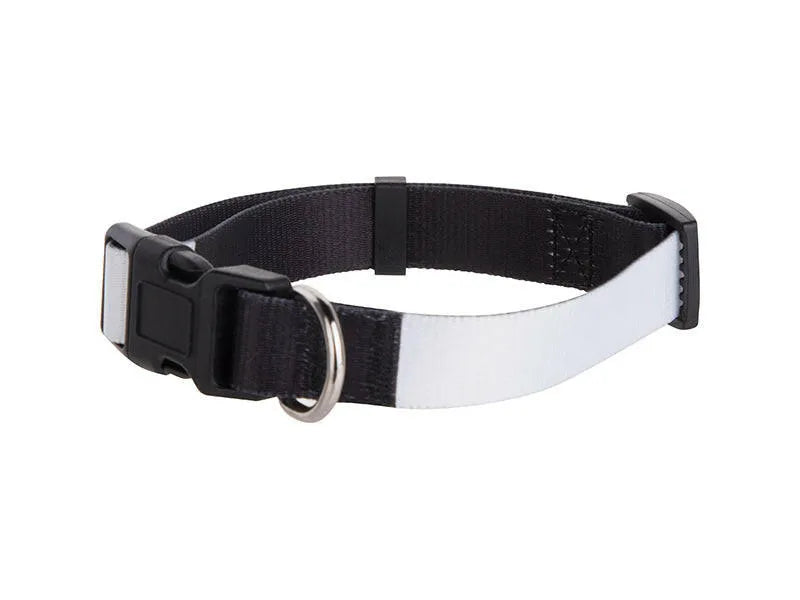
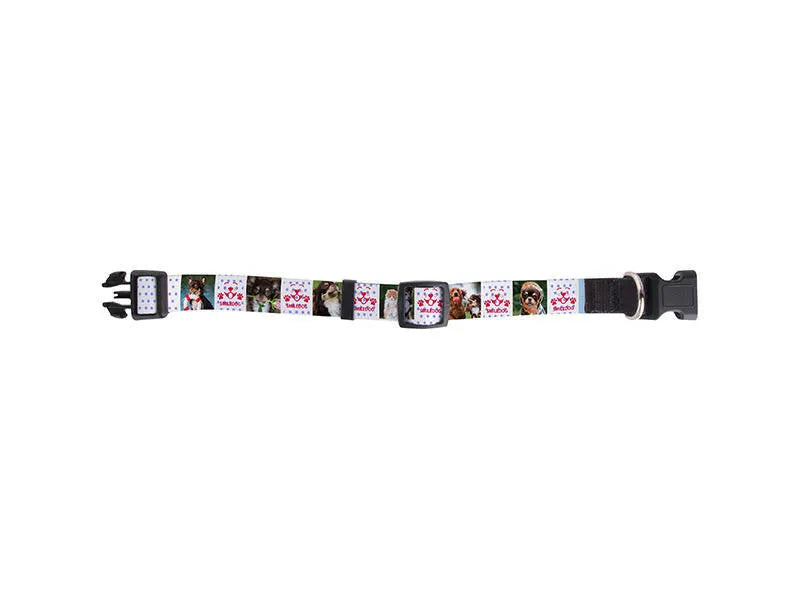
Create personalized dog accessories with the Craft Express 4 Pack Sublimation Pet Collars. Each collar has a smooth white polyester strap for suitable sublimation transfers, an adjustable slider, a plastic quick-release buckle, and a metal D-ring. Add a pet's name, a playful pattern, or coordinated branding to turn a blank strap into a distinctive design.
Works with
-
 Sublimation
-
 VersiFlex
-
 DTF
-
 Vinyl


Choose options
Description
A custom look for a one-of-a-kind companion
Create personalized dog accessories with the Craft Express 4 Pack Sublimation Pet Collars. Each collar has a smooth white polyester strap for suitable sublimation transfers, an adjustable slider, a plastic quick-release buckle, and a metal D-ring. Add a pet's name, a playful pattern, or coordinated branding to turn a blank strap into a distinctive design.
Imagine a name-and-pattern collar included in an adoption gift basket or four coordinated designs for a pet-themed collection. This pack gives you room to create matching styles or a different personality on every strap.
Designed for personalized pet accessories
- White polyester print strap: A canvas for names, patterns, and contact details.
- Adjustable slider: Adjust the selected collar within its actual size range.
- Plastic quick-release buckle: A convenient closure for putting the collar on and taking it off.
- Metal D-ring: An attachment point; load ratings and restraint suitability are not provided.
- Four collars per pack: Create coordinated collections, individual gifts, or small custom batches.
- Medium and Large options: Confirm measurements for the selected size before purchase.
Product specifications
| Feature | Details |
|---|---|
| Brand | Craft Express |
| Pack quantity | 4 blank pet collars |
| Size options | Medium and Large |
| Printable material | White polyester strap; exact fiber percentage is not provided |
| Adjustment | Plastic sizing slider |
| Closure | Plastic quick-release buckle |
| Attachment hardware | Metal D-ring |
| Size guidance | The general FAQ lists approximately 10–18" necks but does not assign that range to Medium or Large. Verify the selected size's actual adjustment range and strap width. |
| Care | Hand wash and air dry |
Printing and compatibility guide
| Requirement | Guidance |
|---|---|
| Printable area | Only the white strap is confirmed as sublimation-ready. Buckles, sliders, and D-rings are not printable. |
| Ink and transfer paper | Use sublimation ink and paper suitable for this polyester strap. Confirm the complete transfer system rather than relying on printer brand alone. |
| Heat press | Use equipment suitable for flat textile straps. Keep hardware outside direct heat and platen pressure. |
| Artwork placement | Measure the usable strap and plan around the buckle, slider, and adjustment overlap. Check how much design remains visible at the intended fit. |
| Sectional pressing | The instructions allow pressing in sections for longer straps. Plan alignment and follow current guidance to avoid unintended reheating. |
| Listed press guidance | 385–400°F for 45–60 seconds; the FAQ specifies medium pressure. Confirm current collar-specific instructions and test one first. |
| Transfer removal | Allow the strap to cool before removing the paper. |
| Other methods | Compatibility with alternative ink systems, vinyl, or DTF transfers requires separate confirmation. |
How to personalize your pet collars
- Confirm the selected collar's actual dimensions and adjustment range. Measure the white printable strap before sizing artwork.
- Plan your design around hardware and overlap areas. If adding a name or phone number, check that it will remain visible at the intended adjustment.
- Print with suitable sublimation ink and paper using the required artwork orientation.
- Lay the printable strap flat with the buckle, slider, and D-ring clear of direct heat and pressure. Position the transfer against the printable face and secure with heat-resistant tape.
- Use protective supplies required by your process and follow current collar-specific pressing directions. The listing specifies 385–400°F for 45–60 seconds with medium pressure. Test one collar before batch production.
- Press in sections if needed according to product guidance. Allow the collar to cool before removing the transfer.
- Inspect the strap, seams, adjustment slider, and closure after decorating before packaging or use.
Frequently asked questions
How many collars are included?
The pack contains four blank sublimation pet collars. Select the size option appropriate to your project.
What sizes are available?
The product has Medium and Large options. The general FAQ gives an approximate 10–18" neck range without identifying which option it describes. Confirm each selected size's measurements rather than applying that range to both.
How should I choose a size?
Measure the pet's neck and compare it with the selected collar's verified adjustment range and manufacturer fitting guidance. Breed or size labels alone do not establish fit.
Can I print over the buckle or hardware?
No. Only the white strap is confirmed as printable. Keep plastic components and metal hardware out of direct pressing heat and pressure.
Can I add a pet's name or contact information?
Yes, these are suggested design uses. Choose readable lettering and check visibility after adjustment. A printed design does not establish a permanent identification method.
What settings are listed?
The instructions list 385–400°F for 45–60 seconds, and the FAQ specifies medium pressure. Let the collar cool before removing the paper. Confirm suitability for your equipment and test first.
How should I clean the collars?
The listed care guidance is hand washing and air drying. Follow any additional manufacturer care instructions.
Are these rated for pulling, tie-out, or breakaway use?
No load rating, tie-out approval, or breakaway function is established in the supplied product details. A quick-release buckle is not confirmation of a breakaway mechanism; confirm suitability with the manufacturer for the intended use.
Can I print both sides?
Double-sided printability is not confirmed. Use the designated printable face unless current product instructions state otherwise.