




The Benefits of Adding an Option Tray to Your SG1000 Printer
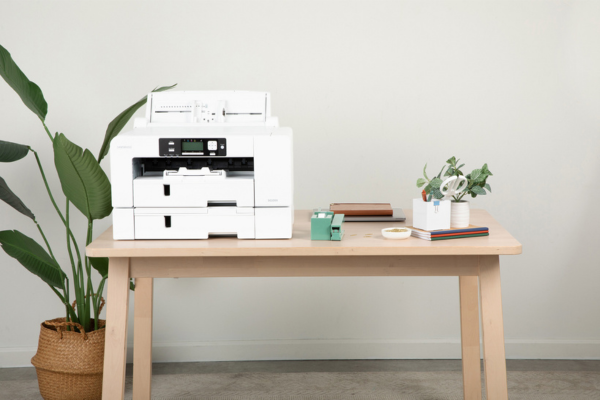
If you use an SG1000 printer for sublimation or VersiFlex projects, adding an option tray can be a game changing upgrade. An option tray allows you to load multiple paper sizes at once, helping you work faster, stay organized, and reduce printing mistakes. Instead of stopping to swap paper between jobs, you can move smoothly from one project to the next.
This guide explains what an option tray is, how it improves your workflow, and why it is especially helpful for crafters and small businesses using the SG1000.
What Is an Option Tray for the SG1000
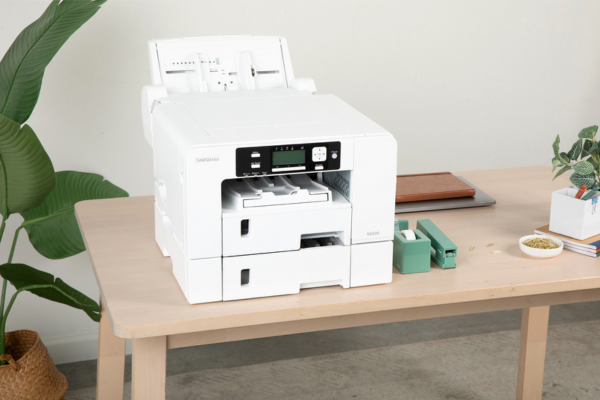
An option tray is an additional paper tray that attaches to your SG1000 printer. It expands your printer’s capacity by allowing you to keep a second paper size loaded at all times.
With an option tray, you can:
-
Store two different paper sizes in the printer
-
Select the correct tray directly from your print settings
-
Reduce the need to reload paper between projects
This simple addition can save time and reduce wear on your paper and printer.
Why an Option Tray Improves Everyday Printing
Faster Workflow with Less Stopping
Without an option tray, switching paper sizes means unloading paper, adjusting guides, and reloading. When you do this multiple times a day, it slows down your workflow.
With an option tray, you can:
-
Print small designs like shirt fronts
-
Switch instantly to larger designs for signs or banners
-
Keep working without interruptions
This is especially helpful when juggling multiple orders or custom requests.
Fewer Printing Errors and Less Waste
Frequent paper changes increase the chance of mistakes, such as printing on the wrong paper size or loading paper incorrectly.
An option tray helps:
-
Reduce misprints
-
Prevent paper jams caused by frequent handling
-
Protect specialty transfer paper from damage
Less waste means lower costs and less frustration.
Ideal for Sublimation and VersiFlex Users
Many SG1000 users work with more than one decorating method. An option tray makes it easier to stay organized.
Common setups include:
-
One tray for sublimation paper
-
One tray for VersiFlex transfer media
-
One tray for standard size prints and one for oversized designs
Keeping each paper type in its own tray helps prevent costly mix ups and supports consistent results.
Reliable printing pairs well with consistent pressing using Craft Express heat presses.
A Smart Upgrade for Small Businesses
If you sell custom apparel, home decor, or promotional items, time matters. An option tray supports business growth by helping you work more efficiently.
Benefits for sellers include:
-
Faster order turnaround
-
Easier handling of mixed size orders
-
Smoother production days
When paired with quality materials from Craft Express blanks and apparel, this upgrade helps you maintain consistency as your business grows.
Supports Larger and More Creative Projects
The SG1000 is designed for larger format printing, and an option tray helps you take full advantage of that capability.
With multiple trays, you can:
-
Keep large format paper ready at all times
-
Experiment with oversized designs
-
Expand into new product types without slowing down
This flexibility encourages creativity and helps you offer more variety to customers.
Easy to Install and Simple to Use
One of the biggest advantages of the option tray is how easy it is to add. Once installed, the tray integrates with your printer software so you can choose the paper source directly from your computer.
There is no complicated setup, making it a beginner friendly upgrade that delivers immediate benefits.
When an Option Tray Makes the Most Sense
An option tray is a great choice if you:
-
Regularly print multiple paper sizes
-
Use both sublimation and VersiFlex
-
Want to reduce paper handling and waste
-
Are running a small craft business or side hustle
Even hobby crafters often find that the added convenience quickly becomes essential.
Tools That Complete an Efficient Setup
An organized printing workflow works best when paired with the right pressing tools.
Helpful additions include:
-
A reliable heat press
-
Fresh protective paper
-
Heat resistant tape
-
Pressing pillows for seams and layers
You can find many of these essentials in Craft Express heat press accessories.
Final Thoughts
Adding an option tray to your SG1000 printer is a simple upgrade that delivers real benefits. It saves time, reduces errors, and helps your workflow keep pace with your creativity. Whether you are crafting for fun or fulfilling customer orders, an option tray makes printing easier and more efficient.
If you regularly switch paper sizes or work across multiple project types, this small addition can make a big difference.
Ready to start your handmade sublimation, VersiFlex, DTF or HTV business? Head to craftexpressus.com for heat presses, blanks, supplies and more!
FAQ: SG1000 Option Tray
Do I need an option tray to use the SG1000?
No, but it makes managing multiple paper sizes much easier.
Can I load different paper types in each tray?
Yes, many users dedicate each tray to a specific paper type.
Is the option tray hard to install?
No, installation is straightforward and beginner friendly.
Does the option tray improve print quality?
It improves workflow and consistency, which helps maintain reliable results.

Leave a comment
This site is protected by hCaptcha and the hCaptcha Privacy Policy and Terms of Service apply.